Version 9 Preview – Modifiers

Welcome to the first in a series of posts that will provide a preview of some of the new features that will be included in Version 9.

The Modifiers feature of Uniwell AX/HX POS Terminals provides an elegant way to handle product variations. For example, a café may use modifiers to allow for small, regular, large and extra-large drinks – giving each variation a different price.

Modifier Messages

Version 9 will include support for programming the modifier messages used to identify variations of a product.

Uniwell Lynx v9 Modifier Messages

These modifier messages will also be shown in the drop-down lists when editing items making it much easier to setup modifiers for your products.
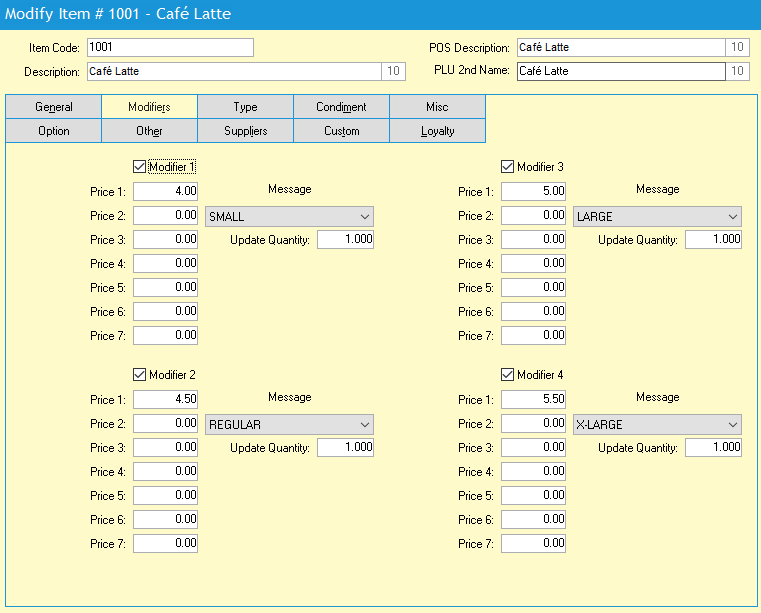
Uniwell Lynx v9 Modifiers Tab

Item Sales by Modifier Report

An Item Sales by Modifier Report will also be included in Version 9 so that you can analyse your sales of product variations.
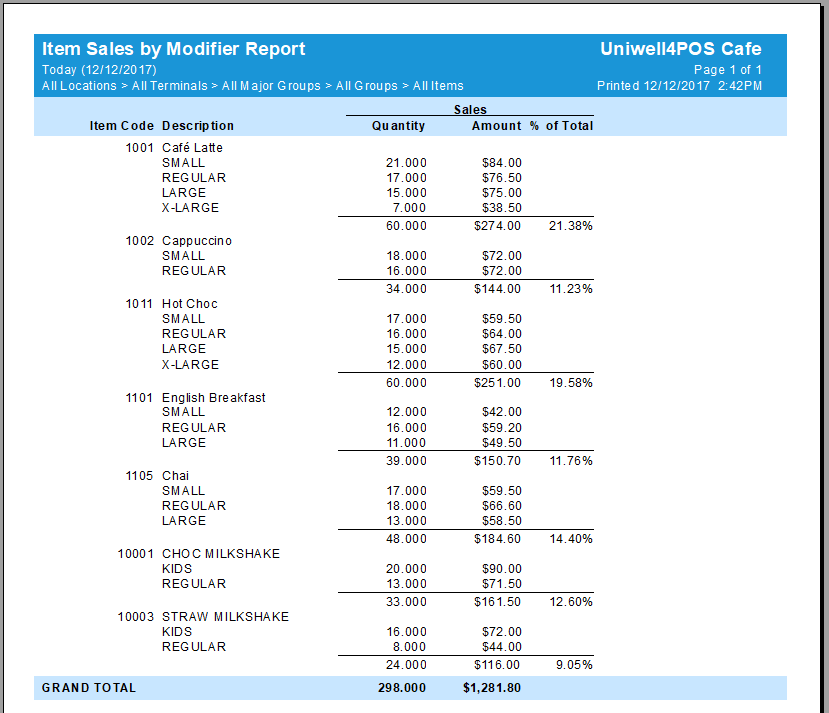

Uniwell Lynx v9 Item Sales by Modifier Report

Don’t Miss the Promotional Opportunity That’s Right in Front of You — Uniwell4POS

Your Point of Sale terminal is a vital piece of hospitality equipment. It allows you to maintain your menu and prices, ensures sales entry accuracy, acts as a communication hub between the front-of-house and back-of-house, and provides critical sales data for analysis. But did you know that your POS can be an active promotional tool? […]

via Don’t Miss the Promotional Opportunity That’s Right in Front of You — Uniwell4POS

Uniwell Lynx v8.05.0004

Release Date:    18/08/2017

New Features

  • Stock Production Report added to Stock Transfers
  • ‘Automatically set Date Joined when new Customer is created’ option added to Preferences > Other
  • ‘Extract Customer Bill (Text) report instead of Journal Data report (AX/HX)’ supported for FTP Server communications
  • Updated PostgreSQL to 9.6.4-1 for Enterprise version

Uniwell Lynx v8.04.0029

Release Date:    03/08/2017

AX/HX Screen Layouts

  • Image number assigned to selected button shown on Image button
  • Invalid image files ignored when importing image files
  • Image alignment setting in Image Select applied to all selected buttons
  • ‘Apply image to all selected buttons’ option added to Image Select