We are pleased to announce the release of Uniwell Lynx v8!
Smart Reporting
Cloud-based POS reports without monthly fees! The Smart Reporting features in Uniwell Lynx v8 make it easier than ever to have the reports you want automatically sent to your smart device.
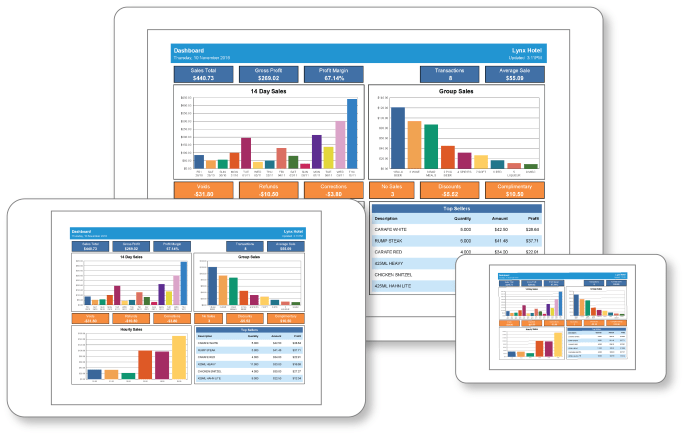
- New Dashboard and Weekly KPI Reports
- Read Sales Batches can be processed allowing data on all reports to be updated
- Read Sales jobs can be scheduled for automated report updates
- Email/Cloud format option added to Saved Reports (PDF/CSV/XLS)
- Date/time stamp in the filename of reports sent to cloud drives option added to Saved Reports
- Repeat Hourly option added to Scheduled Jobs
Customer Promotions
Build customer loyalty with promotions. Use advanced filtering to target your promotions to new customers, inactive customers, customers that have purchase a particular product and many other options.
- Advanced filtering to select the customers for your promotion
- Email your promotion with attachments direct to your customers or export a list of your selected customers for use with external software or online marketing solutions
Better Customer Account Management
Greater control over customer payment entry making it easier to reconcile your customer accounts.
- Customer payment entry enhanced to allow payments to be allocated to specific invoices
- Customer Statement format option added
- Activity: Shows all transactions for selected date range
- Outstanding: Shows only outstanding transactions
Reporting Enhancements
- New report style
- New Group Hourly Sales Report
- Average column added to Daily Sales Report
- Show Wastage option added to Item Sales report
- Cost column added to Item Wastage Report
- ‘Show customer points value’ option added to Customer Balances report
- Option to use regional long date format for date ranges on reports
- Option to show cost prices on Item/PLU/Barcode Price Lists
- Reorder Levels Listing
- Email address added to Customer Listing
- Price 1 added to Look Up PLU Listing
New POS Programming and Data Maintenance Features
- Date range and day of week options added to Mix and Match
- Tax programming (for AX/HX only)
- Upper/Lower Logo text programming (for AX/HX only)
- Function Texts added to Extract Program (for AX/HX only)
- Grid-style editing of Reorder Levels
- Group/Sort PLU pages simulated in AX/HX Screen layouts
- PLU/Barcode shown instead of Item Code in PLU selection grid when editing AX/HX Screen Layouts
- PLU codes expanded from 6 digits to 18 digits so that PLU codes longer than 6 digits no longer have to be entered as barcodes
- Security Level added to Clerks data grid
- Custom fields 1 to 4 added to Customers
- Automatic generation of PLU Code from Item Code for new items during Import Items if Item Code is a valid PLU Code and PluCode column not included in import file
Other New Features
- Launch VNC option added to Sales Terminals grid for HX terminals (requires 3rd party VNC software)
- Option to edit email subject and message when emailing Purchase Orders
- ‘Data grid filters on text fields assume % wildcard prefix’ option added to Preferences
- ‘Auto-populate PLU Code with Item Code when adding new Items’ option added to Preferences
Technology Phase Out
- Support for SX-6xxx/PX/EX/LX/NX series ECRs removed
Note: Version 8 can be purchased with downgrade rights to Version 7 if support for the above models is required
 Lynx Software